Latest Post

Communication Setting for PLC Mitsubishi

Written By Mr Lam on Wednesday, May 16, 2012 | 2:57 PM

For Communication Setting for PLC Mitsubishi on SoftwarePLC GX Developer, Step by Step :
Step 1
Open Software PLC Mitsubishi GX Developer 
Software PLC Mitsubishi GX Developer
Step 2 
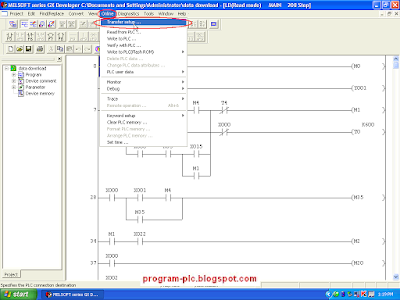
Click Online --> Click Tranfer setup ... 
Online Tranfer setup
Step 3 
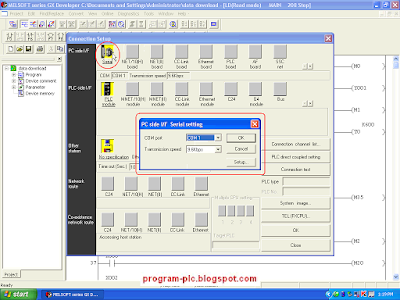
Show Menu Connection Setup 
Click icon Serial 
Show Dialog Box " PC side I/F Serial setting" 
Icon Serial
Step 4 
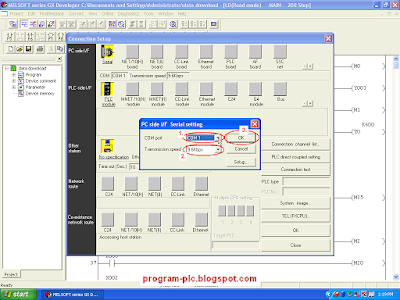
Show Dialog Box " PC side I/F Serial setting" 
Select COM Port --> Select Transmission speed --> Click OK Button 
PC side I/F Serial setting
Step 5 
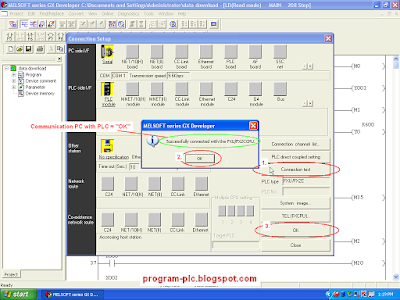
Display Menu Connection Setup 
Click Connection test Button 
If Communication OK Then Show Dialog Box "Successfully connected with the .... ( PLC Type )---> Click OK Button
Display Menu Connection Setup ---> Click OK Button
Successfully connected

Download Program Ladder Diagram from PC to PLCMitsubishi

 Pls follow Step bellow
For Download Program Ladder Diagram from PC to PLCMitsubishi, Step by Step :
Step 1
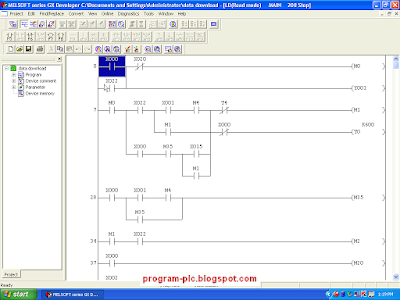
Software PLC Mitsubishi, Open Software GX Developer 
Software GX Developer
Step 2 
Click Project --> Click Open Project... ( Ctrl + O) 
And Show Open Dialog 
Click Open Project
OR 
Step 2 
Click Icon Open Project 
And Show Open Dialog 
Click Icon Open Project
Step 3 
If Show Open Dialog Then Select Project Name --> 
After the Porject Name has been Selected --> 
Click Open Button
Select Project Name
Step 4
If Lader Diagram is Open Then : 
Click Online --> Click Write to PLC ... 
Write to PLC
Step 5
Menu Write to PLC 
Click Param+Prog --> Click Execute Button 
Show Dialog Box "Execute write to PLC" --> Click Yes Button 
Execute write to PLC
Step 6
Menu Write to PLC 
Waiting Write to PLC --> 
Writing... Parameter --> Writing... Program MAIN
Waiting Write to PLC
Step 7
Menu Write to PLC 
Show Dialog Box "Completed." --> Click OK Button --> 
Click Close on Menu Write PLC
Process Write to PLC has been Finish
Close on Menu Write PLC(source : http://program-plc.blogspot.com)

Solutions – Safety

Written By Mr Lam on Friday, May 4, 2012 | 2:47 PM


The MELSEC WS Safety Controller provides a cost effective way to add a safety controller capability to individual machines, or smaller scale systems. Mitsubishi Electric is proud to announce that the WS is a joint development with SICK AG of Germany, an acknowledged leader in the global machine safety industry. Its compact size insures easy placement in most control cabinets, without adding extra cost. Configuration saves engineering time by using a graphical icon based method, and program development and certification is simplified by the use of safety function blocks. For more complex needs, the WS is also scalable by simply adding additional I/O modules. Finally, integration with conventional control systems is easily achieved with the CC-Link open network connection or Ethernet.

Specifications

WS Safety Controller
I/O capacity
144 points (single channel)/72 points (dual channel)
Program memory capacity
Up to 255 function blocks
I/O
Modular units (up to 18), single or dual channel
I/O types available
DC safety in & out, safety relay out
Diagnostic capabilities
Internal state monitoring, execution error history
Network connectivity
CC-Link, Ethernet, EFI (direct communication with SICK safety devices)
Safety certifications
IEC 61508 SIL 3, ISO13849-1 PL e (EN 954 Category 4)

Compact PLC – MELSEC FX1N


The controllers of the FX1S series deliver outstanding functionality with up to 30 inputs and outputs in a very compact package. The FX1S is ideal for applications in difficult-to-access installations and systems where normal servicing is not possible. The integrated real-time clock and maintenance-free EEPROM with capacity for up to 2,000 program steps make the FX1S an autonomous and very service-friendly system.
FX1S series highlights:
  • 10 to 30 inputs and outputs
  • High processing speed (0.55µs per log. instruction)
  • Ample program storage space and large device ranges · Integrated positioning controller
  • Serial communications options (RS-232, RD-422, RS-485)
  • Analog signal processing with optional expansion adapters
  • Integrated real-time clock
  • User-friendly programming with MS Windows-based programming software package or hand-held programming unit
  • Expandable with adapters or display modules
Product range
Type
FX1S-10M
FX1S-14M
FX1S-20M
FX1S-30M
Power supply
100-240V AC / 24V DC
No. of inputs
6
8
12
16
No. of outputs
4
6
8
14
Digital outputs
Relay / Transistor
Program cycle period per logical instruction
0.55 - 0.7 µs
User memory
2000 steps EEPROM (internal)
Dimensions in mm (WxHxD)
60x90x75
60x90x75
75x90x75
100x90x75

MELSOFT-Software – GX IEC Developer


GX IEC Developer is more than a powerful IEC 1131.3 programming and documenation package. It supports your entire MELSEC PLC impleentation from the initial project planning to everyday operation, with a wealth of advanced functions that will help you to cut costs and increase your productivity.
The sophisticated program architecture comes with a range of new, user-friendly functions, including structured programming and support for function libraries.

Top-down application architecture
During the planning phase GX IEC Developer's structuring tools help you to organise your project efficiently: Use the intuitive graphical tools to identify and display tasks, functional units, dependencies, procedures and application structures. In addition to making your work easier, this also significantly reduces error frequency in later project stages.
Flexible implementation
In the engineering phase you then choose the programming language that best matches the structure of your project.
Program frequently-used functions in function blocks and organise them in libraries. This gives you the confidence that comes with knowing you are using tested, reliable code. Password support helps you to protect your valuable expertise.
Simple configuration of control components
Configuration of controller components is performed quickly and efficiently in tables with interactive dialogs and graphical support. And this powerful support is available for standard and special function modules as well as for the controller CPUs. You no longer have to create application programs to configure your system.
Setting up the hardware and network configuration
Powerful testing and debugging tools provide information on the current status of the controllers and the network you are connected to. Network functions like status and error displays, remote SET/RST functions for controllers and peripherals, Live List, Cycle Time, Connection State and more enable you to locate and correct errors quickly and get your hardware and networks up and running in record time.
Setting up the application program
GX IEC Developer comes with everything you need to get your applications installed, set up and running as quickly as possible, including comprehensive online programming functions, fast and informative monitoring displays, the ability to manipulate device values with the graphical editors, manual and automatic step mode execution in IL, the display of manipulated device values in the EDM (Entry Data Monitor) and much more.
Normal operation
During normal daily operation you can also use GX IEC Developer to display important system status information, either in stand-alone mode or called by another program in the control room.
Installation and maintenance
Top-down architecture, structured programming, comprehensive printed documentation and support for user-defined help for your function blocks all help to reduce the learning curve. You can make the information needed for installing and maintaining the system available to the operators quickly and efficiently, with minimum training overheads.
Key features include:
  • Powerful "Top-down" development environment
  • Total overview of PLC project and resources
  • Suited to large and complex projects
  • One programming software for modular and compact PLCs (Q/A and FX Series)
  • Flexible program development
  • Superior program documentation for easy understanding
  • State-of-the-art PC software technology acc. to IEC 1131.3
  • Programming languages FBD, AWL, KOP, AS and STC
  • Powerful offline simulation
  • Online program modification
  • Function blocks (FB, FC)
  • Libraries Minimum downtimes
  •  (source : http://www.mitsubishi-automation.com/)
Compact PLC


Full PLC performance in a tiny package

It is now over 30 years since Mitsubishi Electric launched the first compact PLC on the European market. Since then Mitsubishi has become the world market leader in this sector, with over 10 million of its compact controller installations to its credit.
With their compact dimensions and low cost compact controllers have opened up new perspectives in industrial automation. Many applications for which automation was once not even an option can now benefit from the many advantages of these controllers.
The FX3U series that is now being launched worldwide is the third generation Mitsubishi Electric's extremely successful family of compact PLCs. The new flagship line once again sets new standards - and not only in the compact controllers class. The FX3U takes compact controllers into another dimension, delivering performance that was formerly the exclusive domain of larger control systems in a compact package.
The FX family now includes independent but fully mutually-compatible product lines:
What can you expect from the MELSEC FX series?

  • Worldwide compatibility
    thanks to their wide power supply range the FX controllers can be used all over the world
  • Internationally approved
    MELSEC FX controllers conform to all major international industrial standards and maritime classifications
  • Flexible solutions
    the base unit can be combined with optional expansion and special function modules to configure a system that is precisely geared to the needs of your application
  • Simple programming
    complex functions can be combined and executed with a single instruction
  • Speed
    the entire FX family has always set the standards for execution speed (FX3U: 0.065µs per logical instruction)
  • Compatibility
    The lines in the FX family are different and independent products, but they are still fully compatible with one another 
  •  
    Product range
    Type
    FX1S
    FX1N
    FX3G
    FX3U
    FX3UC
    Power supply
    100–240 VAC/ 24 VDC
    100–240 VAC/ 12-24 VDC
    100–240 VAC/ 24 VDC
    100–240 VAC/ 24 VDC
    24 VDC
    No. of inputs
    6–16
    8–36
    8–36
    8–64
    8–48
    No. of outputs
    4–14
    6–24
    8–24
    8–64
    8–48
    Digital outputs
    Relay, transistor
    Transistor
    Program cycle period per logical instruction
    0.55–0.7 µs
    0.55–1 µs
    0.21–0.42 µs
    0.065 µs
    0.065 µs
    User memory
    2k steps EEPROM (internal)
    8k steps EEPROM (internal), EEPROM/EPROM cassettes (optional)
    32k steps EEPROM (internal), EEPROM cassettes (optional)
    64k steps (standard), FLROM cassettes (optional)
    64k steps (standard), EEPROM cassettes (optional)
    Dimensions in mm (WxHxD)
    60–100x90x49
    90–175x90x75
    90–175x90x86
    130–350x90x86
    34–86x90x74

    Type
    FX2N
    Power supply
    100-240 VAC/ 24 VDC
    No. of inputs
    8-64
    No. of outputs
    8-64
    Digital outputs
    Relay, transistor
    Program cycle period per logical instruction
    0.08 µs
    User memory
    8,000 steps PLC-Program (RAM internal), optional 16 k RAM/EEPROM
    Dimensions in mm (WxHxD)
    150-350x90x87

Strategic Teacher PLC Guide

Strategic Teacher PLC Guide


Using the correct strategic teacher PLC guide helps you provide research-based, high impact instructional practices for the PLC classroom. So that you can provide the best instructional practices for your PLC classroom, you will need to find the right strategic guide for PLC teacher. Excellent strategic guide for PLC teacher can be quite useful, because it offers complete guide for teachers to assist their student gaining the needed methods and practices. Proper strategic guide for PLC teacher commonly involve complete item descriptions, comparison organizer, conclusions and generalizations, task completion guide, comparative analysis skill building as well as effective strategy. Therefore, it is recommended that you use the right strategic teacher PLC guide if you wish to provide the best instructional practices for your PLC classroom.

Strategic Teacher PLC Guide for Finding Excellent Guide for PLC Teacher
If you’re a PLC teacher, there are a few guidelines that will help you find the right strategic teacher PLC guide for your PLC classroom:
•To provide the best instructional practices for PLC classroom, ensure the teacher's guide includes separate description for every item using criteria.
•The guide should also include organized comparison that captures key differences and similarities.
•Proper strategic guide for PLC teacher usually includes assistance in forming and discussing each conclusions and generalizations.
•The teacher’s guide must also come with guide in completing related task using synthesizing learning method.
•Excellent strategic guide for PLC teacher additionally should entails guide in building student's comparative analysis skills by examining student's works and different levels of proficiency.
•Make sure it comprises guide in finding effective strategy to explore the class’s phases and principles. This tip could be fairly beneficial in finding the correct strategic teacher PLC guide.

Strategic Teacher PLC Guide Provide High Impact Instructional
To provide the best instructional practices for PLC classroom, you definitely must use the right strategic teacher PLC guide. That's the reason why the proper strategic guide for PLC teacher should includes separate description for every items using criteria, organized comparison that capture key differences and similarities and also assistance in forming, and discussing each conclusions and generalizations. Excellent strategic guide for PLC teacher should also involves guide in completing related task using synthesizing learning method, guide in building student's comparative analysis skills by examining student's works, and also guide in finding effective strategy to explore the classes phases and principles. So, making use of the correct strategic teacher PLC guide is essential as it helps you provide research-based, high impact instructional practices for the PLC classroom. 

(source : http://program-plc.blogspot.com)
 
Support : Creating Website | Johny Template | Mas Template
Copyright © 2011. PLC PROG- REMOTE CONTROL TRAINING - All Rights Reserved
Template Created by Creating Website
Proudly powered by Premium Blogger Template